My official personal Web page

The Internet Home of

Fred Koschara


Web dev

An astoundingly smooth transition

Sep. 29, 2026, under progress reports, Web dev

As I continue to bring my infrastructure out of the dark ages, I’m working on transitioning from PHP 5.6.40 to PHP 8.5.  Last week I worked through installing the new version alongside everything else on this server, then got WordPress updated as well.  Now I’m working on switching the entire wfredk.com website over, and nearly everything that I’ve had to fix has been independent of both the site’s own code and the framework it’s built in, which is amazingly encouraging.

Leave a Comment more...

It’s time to do some marketing!

Sep. 14, 2026, under bootstrap finance, events, goals, progress reports, Web dev

I have finally gotten the Race To Space Affiliate Dashboard to where I don’t feel like I have to do more coding before I can proceed: It has transitioned from being a schedule delay into a valuable marketing asset: The logged-out Dashboard is now an exhibition of the benefits of becoming a Race To Space affiliate rather than a promise of what you might get if you join the team; the logged-in page includes all of the materials promised in the marketing brochure.

This event is a rather liberating experience, and I really wish I had someone special to share the achievement with…

Leave a Comment more...

My blog has finally fully recovered :)

Jun. 25, 2026, under progress reports, Web dev

One way or another my blog has been broken to some degree for a couple of months. It’s not the blog’s fault – the ground was changed underneath its feet, and the building it lives in was reconstructed, altering all of the door and window locations. (Metaphorically speaking, of course…)

More than half of my sites had been running on a CentOS 5 VPS for almost 20 years. (ChatGPT described the system as “museum grade obsolete” – which was “a little” too close to true.) In the middle of April I undertook moving everything from that server to a much newer environment. When I started, I had the “extremely” optimistic expectation it would take a day or two to make the swap. Reality, however, had other plans. After a grueling 3 weeks of working days, nights, weekends and most of everything between, I’d finally gotten all of the functionality moved and the migration complete late in the afternoon of May 6. I notified the the hosting service they could shut down the old VPS, which I strongly suspect was the one remaining instance of CentOS 5 they had been needing to keep running.

There were some hiccups in moving this site and my blog, but it was working happily on the new server – accessible using HTTP only: I hadn’t set up SSL certs and all in moving any of the sites from the old VPS to the new one, everything was carried over as-is.

Being able to change my sites from HTTP to HTTPS was one of the big reasons for moving to a newer operating system, and changing all of my sites to HTTPS was done in just a few days. It almost seemed too easy …

Meanwhile, the laptop I’ve been doing most of my work on, where I’ve got just about everything installed and properly configured, started being more and more unreliable. The BSOD rate started climbing from where it had been 2-5 weeks between crashes – and when I’d had three bluescreens in two days, I had to stop to deal with the problem. I replaced the graphics drivers. That helped – or did it? I replaced the disk drivers. That seemed to make more of a difference – for a short time. I’d at least been able to get a little work done in those two weeks – but then another BSOD stopped me again – and hours later, I ended up disabling everything that might launch DeFrag.exe. winDoze started behaving properly until I used NoScript to disable Amazon’s JavaScript (20% CPU) in one Firefox tab, then went to refresh another Amazon tab (so it would know JS had been stopped.) As the screen went dark before turning the all-too-familiar shade of blue, I thought to myself “I shouldn’t have just done that right then …” At least I knew where that problem came from.

As if I didn’t have enough to keep me busy, I needed to install PHP-FPM on the new server so I could simultaneously have the current version of PHP available for new software, and the “older” version needed by a large part of the massive PHP code base I’ve built up over the past few decades. Getting the extension working “properly” had been a required part of the migration that I had done on May 6, so I should be all set, right? Wait, what does “Primary script unknown” mean in the error log? What primary script? … and when there’s an error saying “Undefined variable: ... in ... on line 74” how did that happen – who called that script, what parameters were passed in the original request? I ended up spending a week and a half exploring the PHP-FPM source code and building a new version of the package on my server that has reasonable error reporting that is now a diagnostic tool rather than noise – but another big chunk of time had gone by.

I was wrapping up something else when I happened to pass by my blog here and discovered it had pretty much become completely broken. A few other fairly serious problems had also come up on the rest of the site. I’ve become quite anxious to get back to being focused on the higher priority work I’ve got “on the stove,” but investing “a little” time to get my “Internet Home” into order seemed like a good idea. It’s now about 26 hours of wall clock time later, but I’ve now gotten to where I can say “wfredk.com and its blog are now presentable enough that I can leave further work until ‘later’” and I can close the book on this chapter.

The patient is being discharged from the hospital and can go home to return to normal life.

Leave a Comment more...

A “design pattern” to avoid

Apr. 15, 2026, under bugfix, good advice, software dev

NEVER write some random piece of bare data to common (system-wide, site-wide, etc.) logs, e.g. in PHP using error_log(), even during “quick” debugging: ALWAYS include some kind of tag identifying the piece of data and why it is being logged.

If you get interrupted and forget you put that logging in, and don’t discover it in the logs until a week later when that task had long since gone out of your mind, you could end up spending easily half an hour chasing the source of the “problem” down.

Leave a Comment more...

Investor sought for FredLines-Tshirts.com

Jun. 05, 2024, under bootstrap finance, call to action, progress reports, Web dev

I am currently seeking $75,000 to underwrite redevelopment of the FredLines-Tshirts.com website, originally built in 1997, into a functioning and profitable business.

I’m willing to pay a $5,000 finder’s fee to anyone who introduces me to such an investor when the deal is completed.

Please contact me with serious inquiries only.

Leave a Comment more...

Installing WordPress 5.1.18 broke updating and installing new plugins

Jun. 05, 2024, under disturbing, really???, Web dev

Before adding new posts to my blog, I decided to upgrade WordPress on my server from 4.6.3 to 5.1.18.

BIG MISTAKE!!

My server is running PHP 5.3.8, so I cannot upgrade to 6.5.3. WordPress offered 5.1.18 as an alternative, but I had to manually install the update from the server’s command prompt because WordPress cannot do it internally. Not a problem, I am very familiar with Linux command line.

However, when I tried to update the plugins and themes, the connection type radiobutton was stuck on FTPS (SSL) – not a problem, since that’s the connection type I want to use. When I told it to proceed after entering my password, though, I got an error message stating

Failed to connect to SSH2 Server fkeinternet.com:22

WAIT! I didn’t ask for an SSH2 connection, and even if I wanted one, the radiobutton is stuck on FTPS! Why is WordPress trying to initiate an SSH2 connection when everything says it should NOT be doing that?

I found I had exactly the same problem trying to update the installed themes.

I set those problems aside because my objective here is to add some new posts to my blog.

WRONG AGAIN!!

I found every new paragraph is a new “block” – not that I wanted blocks in the first place, but OK, paragraphs can be blocks. I got three paragraphs written, and decided I wanted to change the color of some of the text in the second one. I selected the text by dragging out the range with my mouse cursor. When I went to the Color Settings and picked from the Text Color options, the entire paragraph changed color! This is NOT what I wanted to do. I deselected the color option, and went to edit the paragraph as HTML. I wrapped the selected text in a <span color=”#cdcd77″> directive, switched back to the visual editor – and there was no change. There was also no change when I previewed my post. Back in the editor window, I did something where an “invalid HTML” error appeared.

I deleted the entire paragraph block and retyped it. I figured perhaps I could look at the code when the whole paragraph is colored to see how I should set up my <span> directive. When I looked at the HTML after changing the color, I was horrified to see the <p> directive bounding the paragraph (inside the HTML comment <!– wp:paragraph –> directive added by the Department of Redundancy Department) had been changed to

<p class=”has-text-color has-luminous-vivid-amber-color”>

What? Is <p color=”#cdcd77″> really incomprehensible? (Further incendiary comments withheld…)

I turned to Google, trying to find ways to change the color of just a few words of text in a WordPress post. I found many references saying things like “select the text, use the controls in the toolbar” – but since the options aren’t present in the toolbar, that advice is totally useless.

I then discovered this horrific editor had been introduced in the 5.0 release of WordPress, but it’s possible to get the previous functionality restored by installing the Classic Editor plugin. Great!

but no, FOILED AGAIN!!

I went to the Add New option for the Plugins for my WordPress instance, and there was Classic Editor, right at the top of the list! Just click “Install Now” – and the dialog came up asking for the FTP credentials. This time when I hit the “Proceed” button, I didn’t even get an error message, the same dialog simply came back with the password field apparently filled in.

I thought that perhaps there was a file permissions problem on the server, so I added group write to everything in and under the wp-contents directory. That had no effect.

Again I turned to Google, looking for a way to install the Classic Editor plugin from the Linux command line, since it seems WordPress is now incapable of doing any updates from its GUI. However, I haven’t found anything resembling instructions for a manual installation of Classic Editor.

I guess I’m going to have to revert my WordPress installation to the state it was in before I wasted the day today by trying to do an update. I hope there weren’t any significant database changes, because I’d like to avoid having to reset the entire database system.

I’m glad I did a backup before starting the upgrade process!

This also doesn’t address the issue that Permalinks now ignore my Custom Format selection – an irritation at best.

All I wanted to do was write a couple of new blog posts…

 

Leave a Comment more...

I stumbled again, but I’m still up and running !!

Oct. 22, 2022, under bootstrap finance, bugfix, disturbing, goals, philosophy, puzzling

Last Friday, October 14, I discovered the Buy Bonds buttons on the Invest page on Space Power Now were no longer working:  Between PayPal (continuously) changing their payment system API, moving the site to a different server than it was originally built on, and a few other details, bit rot had set in, and yet another one of my robots was broken.  With everything else going on, it took until Monday evening, October 17, before I got the buttons working once more in the PayPal sandbox.  It was the next morning, October 18, before they were live once more, because I forgot to switch the operation from the sandbox to the live system when I went out to have a few moments’ relief from the stress of working night and day.   It’s things like this that lead me to make comments such as “things break, everything takes longer than it does” as I did in my Deja Vu post on the 11th.

As if that wasn’t enough, I then lost another whole day, 24 hours straddling Tuesday and Wednesday, when I was trying to get the Donate buttons on Use My Middle Name updated and something happened to the server.  I don’t know what I did to trigger it, but after I posted some changes to the site, it suddenly disappeared, and one of the other sites started showing up instead.  I thought perhaps I had done something to the configuration when I was trying to get HTTPS set up.  I went through so many iterations of trying to go back to previous configurations, tweaking the server’s files, re-establishing the certificates, etc., that I completely lost track of how many steps I had taken.  Literally nothing I did made the slightest bit of difference, I couldn’t get Use My Middle Name to be displayed when I went to its URL, in either Firefox or Chrome.  Then I discovered I could go to the site on my phone – it had a few bugs that needed to be worked out, but at least it was the right site!  Unfortunately, a phone may be useful for browsing the Web, but it’s not a useful tool for developing and debugging it, so I had to go back to my laptop – which was still not doing the right thing.  I cleared the DNS cache, restarted the browsers, rebooted the machine – nothing made a difference.  I fell over from exhaustion, and when I came back from getting some rest, the problem was still there, and I had run out of things to try.  I repeated some of the steps I’d tried before I went to sleep, and as before, nothing made a difference.

Then, all of a sudden, almost exactly 24 hours later, it suddenly started working again.  I didn’t consciously make any modifications I could associate with the change, “it” just decided to start doing the right thing once more.  The fact that I have no clue what caused the failure, or what made the failure go away, is at least as much of a concern to me as the 24 hours I lost fighting with the problem:  I can’t explain what happened, or why, so I don’t know if another similar problem is going to come along at some (random) time in the future and take another bite out of me.

Once I was able to see the site on my laptop, it was relatively easy to get the cosmetic issues resolved that I had seen on my phone.  I haven’t gotten the buttons working properly yet because I had to go work on another, more urgent fire.  I guess I’ll have to make that a priority, once I figure out how to keep the electricity on, my phone active, my Internet connection running and get the domain name registration renewed for the sites that have disappeared over the past couple of days.

Right now, things are far from working smoothly for me.  I’m seriously struggling to survive, and it makes me question my decision to not get another J.O.B.[i] in my effort to break the cycle of insanity that has defined my adult life (also mentioned in my Deja Vu post).  However, as my Focus on Your Goals / Obstacles Will Disappear T-shirt advises, I’m doing my best to keep my eyes on the prize, and not let all of the stumbling blocks trip me up.  (You can read more of the T-Shirt Philosophy behind that shirt on FredLines T-shirts – which is yet another one of the Current Projects I’m hoping to find an investor for.)

If you get a cross-site scripting warning when trying to visit the FredLines T-shirts links, allow the page load to proceed:  The issue is a consequence of the ancient and decrepit PerlShop code still running the site – I haven’t had time yet to finish recoding it in PHP with a (MySQL) database behind it – another thing on the list…

I tell people “dancing is the art of not falling down.”  So far, the artist has been successful.  I just have to focus on making it so that continues to happen!

Leave a Comment more...

HumanMathTest, an open source PHP class

Sep. 24, 2018, under software dev, Web dev

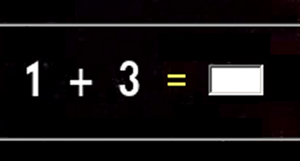
HumanMathTest illustration

I’ve published my first contribution to the FOSS community on github: HumanMathTest implements a math test ‘bot deterrent PHP class for use in online forms.

This class is used to create an image to be included in an online form that shows a simple math test the visitor must solve when submitting the form. The operands and operation are stored in the $_SESSION data for the page. After submitting the form, the visitor’s answer is checked by calling the verify() method to compare their entry vs. the session data. If an error is found, the form submission should be rejected.

The demo page illustrates many of the options available, and includes a link to download the fully commented source code, including that of the demo and example pages.


To support my work, please buy a pre-publication copy of Race To Space. For more info about the project, see the Race To Space site, subscribe there to be kept abreast of its progress.


We are going to run out of oil. Before that happens, we MUST have a replacement source of energy and feed stock for our civilization that has become so dependent on plastic. The time to act is NOW!! Please visit SpacePowerNow.org to help build a solution.

Leave a Comment more...

“Gray skies blue” and “Wrong starting point” gigs on Fiverr

Aug. 24, 2014, under Web dev

I’ve posted my first two gigs on Fiverr. For the bargain price of $5 each, you can get these services.

In my first gig, I’m offering to turn gray (or grey) skies blue:

I will take your cloudy day pictures and give them a nice cloudless blue sky in the background, lighter near the horizon as you will find in nature.

I'll turn your gray skies blue
( Click the image for a larger view )

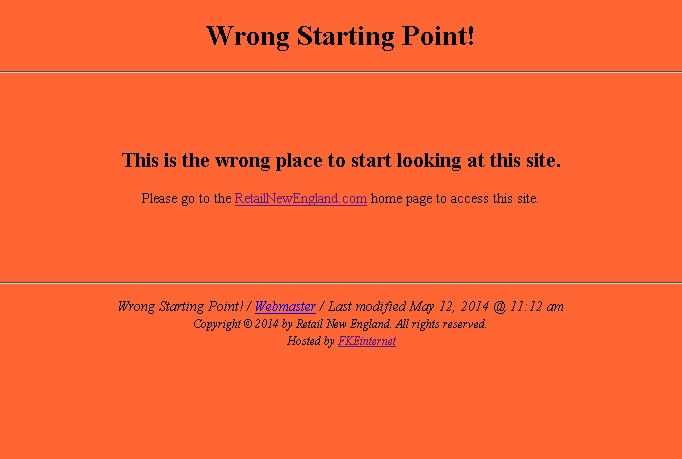
In the second gig, I’m offering to create a “you don’t belong here” page for Web sites:

Every site has one or more directories where visitors should not go. For example, if you have a directory with nothing but images in it, or include scripts, you would not want someone rummaging around through them. Put this file in those directories, and if a browser finds their way into one, it will send them back to your home page without revealing the contents of the directory.

You will receive a ZIP file containing a stand-alone XHTML Strict compliant HTML page file with no external dependencies, fully customized for your site.

'You don't belong here' Web page screen capture
( Click the image for a larger view )

If you can think of any other services I could reasonably offer for $5 each, I’d be interested in hearing your ideas…


We are going to run out of oil. Before that happens, we MUST have a replacement source of energy and feed stock for our civilization that has become so dependent on plastic. The time to act is NOW!! Please visit SpacePowerNow.org to help build a solution.

Leave a Comment more...

WholesaleNewEngland and RetailNewEngland – domains for sale

Aug. 18, 2014, under Web dev

I’ve listed WholesaleNewEngland.com for sale on Sedo in conjunction with RetailNewEngland.com. You can find the WNE offer page here and the RNE offer page here.

Note that Sedo sales are for domain names only – the domain name purchases do not include the UI technology demonstration sites at WholesaleNewEngland.com and RetailNewEngland.com. Please contact me to work out the necessary details if you would like to have me develop them into full Web sites.

Contact me directly for this or other Web development work. Depending on the project terms we agree to, I may work either at a per-hour rate or at a fixed price.

I have over 15 years of Web development experience using PHP, MySQL, JavaScript, CSS and other tools and languages. My resume can be viewed at http://wfredk.com/bio/resume.php illustrating this and the other diversified work in my background.


We are going to run out of oil. Before that happens, we MUST have a replacement source of energy and feed stock for our civilization that has become so dependent on plastic. The time to act is NOW!! Please visit SpacePowerNow.org to help build a solution.

Leave a Comment more...